
Spaces:
Sleeping

Sleeping
| <h1 align="center">川虎 Chat 🐯 Chuanhu Chat</h1> | |
| <div align="center"> | |
| <a href="https://github.com/GaiZhenBiao/ChuanhuChatGPT"> | |
| <img src="https://user-images.githubusercontent.com/70903329/227087087-93b37d64-7dc3-4738-a518-c1cf05591c8a.png" alt="Logo" height="156"> | |
| </a> | |
| <p align="center"> | |
| <h3>为ChatGPT/ChatGLM/LLaMA等多种LLM提供了一个轻快好用的Web图形界面</h3> | |
| <p align="center"> | |
| <a href="https://github.com/GaiZhenbiao/ChuanhuChatGPT/blob/main/LICENSE"> | |
| <img alt="Tests Passing" src="https://img.shields.io/github/license/GaiZhenbiao/ChuanhuChatGPT" /> | |
| </a> | |
| <a href="https://gradio.app/"> | |
| <img alt="GitHub Contributors" src="https://img.shields.io/badge/Base-Gradio-fb7d1a?style=flat" /> | |
| </a> | |
| <a href="https://t.me/tkdifferent"> | |
| <img alt="GitHub pull requests" src="https://img.shields.io/badge/Telegram-Group-blue.svg?logo=telegram" /> | |
| </a> | |
| <p> | |
| 实时回复 / 无限对话 / 保存对话 / 预设Prompt集 / 联网搜索 / 根据文件回答 <br /> | |
| 渲染LaTeX / 渲染表格 / 代码高亮 / 自动亮暗色切换 / 自适应界面 / “小而美”的体验 <br /> | |
| 自定义api-Host / 多参数可调 / 多API Key均衡负载 / 多用户显示 / 适配GPT-4 / 支持本地部署LLM | |
| </p> | |
| <a href="https://www.bilibili.com/video/BV1mo4y1r7eE"><strong>视频教程</strong></a> | |
| · | |
| <a href="https://www.bilibili.com/video/BV1184y1w7aP"><strong>2.0介绍视频</strong></a> | |
| || | |
| <a href="https://huggingface.co/spaces/JohnSmith9982/ChuanhuChatGPT"><strong>在线体验</strong></a> | |
| · | |
| <a href="https://huggingface.co/login?next=%2Fspaces%2FJohnSmith9982%2FChuanhuChatGPT%3Fduplicate%3Dtrue"><strong>一键部署</strong></a> | |
| </p> | |
| <p align="center"> | |
| <img alt="Animation Demo" src="https://user-images.githubusercontent.com/51039745/226255695-6b17ff1f-ea8d-464f-b69b-a7b6b68fffe8.gif" /> | |
| </p> | |
| </p> | |
| </div> | |
| ## 目录 | |
| |[使用技巧](#使用技巧)|[安装方式](https://github.com/GaiZhenbiao/ChuanhuChatGPT/wiki/使用教程)|[常见问题](https://github.com/GaiZhenbiao/ChuanhuChatGPT/wiki/常见问题)| [给作者买可乐🥤](#捐款) | | |
| | ---- | ---- | ---- | --- | | |
| ## 使用技巧 | |
| - 使用System Prompt可以很有效地设定前提条件。 | |
| - 使用Prompt模板功能时,选择Prompt模板集合文件,然后从下拉菜单中选择想要的prompt。 | |
| - 如果回答不满意,可以使用`重新生成`按钮再试一次 | |
| - 对于长对话,可以使用`优化Tokens`按钮减少Tokens占用。 | |
| - 输入框支持换行,按`shift enter`即可。 | |
| - 可以在输入框按上下箭头在输入历史之间切换 | |
| - 部署到服务器:将程序最后一句改成`demo.launch(server_name="0.0.0.0", server_port=<你的端口号>)`。 | |
| - 获取公共链接:将程序最后一句改成`demo.launch(share=True)`。注意程序必须在运行,才能通过公共链接访问。 | |
| - 在Hugging Face上使用:建议在右上角 **复制Space** 再使用,这样App反应可能会快一点。 | |
| ## 安装方式、使用方式 | |
| 请查看[本项目的wiki页面](https://github.com/GaiZhenbiao/ChuanhuChatGPT/wiki/使用教程)。 | |
| ## 疑难杂症解决 | |
| 在遇到各种问题查阅相关信息前,您可以先尝试手动拉取本项目的最新更改并更新 gradio,然后重试。步骤为: | |
| 1. 点击网页上的 `Download ZIP` 下载最新代码,或 | |
| ```shell | |
| git pull https://github.com/GaiZhenbiao/ChuanhuChatGPT.git main -f | |
| ``` | |
| 2. 尝试再次安装依赖(可能本项目引入了新的依赖) | |
| ``` | |
| pip install -r requirements.txt | |
| ``` | |
| 3. 更新gradio | |
| ``` | |
| pip install gradio --upgrade --force-reinstall | |
| ``` | |
| 很多时候,这样就可以解决问题。 | |
| 如果问题仍然存在,请查阅该页面:[常见问题](https://github.com/GaiZhenbiao/ChuanhuChatGPT/wiki/常见问题) | |
| 该页面列出了**几乎所有**您可能遇到的各种问题,包括如何配置代理,以及遇到问题后您该采取的措施,**请务必认真阅读**。 | |
| ## 了解更多 | |
| 若需了解更多信息,请查看我们的 [wiki](https://github.com/GaiZhenbiao/ChuanhuChatGPT/wiki): | |
| - [想要做出贡献?](https://github.com/GaiZhenbiao/ChuanhuChatGPT/wiki/贡献指南) | |
| - [项目更新情况?](https://github.com/GaiZhenbiao/ChuanhuChatGPT/wiki/更新日志) | |
| - [二次开发许可?](https://github.com/GaiZhenbiao/ChuanhuChatGPT/wiki/使用许可) | |
| - [如何引用项目?](https://github.com/GaiZhenbiao/ChuanhuChatGPT/wiki/使用许可#如何引用该项目) | |
| ## Starchart | |
| [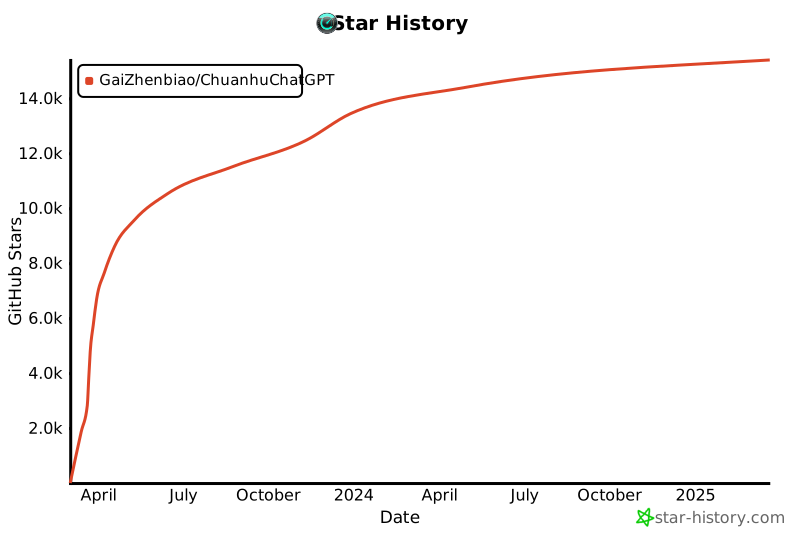](https://star-history.com/#GaiZhenbiao/ChuanhuChatGPT&Date) | |
| ## Contributors | |
| <a href="https://github.com/GaiZhenbiao/ChuanhuChatGPT/graphs/contributors"> | |
| <img src="https://contrib.rocks/image?repo=GaiZhenbiao/ChuanhuChatGPT" /> | |
| </a> | |
| ## 捐款 | |
| 🐯如果觉得这个软件对你有所帮助,欢迎请作者喝可乐、喝咖啡~ | |
| <img width="250" alt="image" src="https://user-images.githubusercontent.com/51039745/226920291-e8ec0b0a-400f-4c20-ac13-dafac0c3aeeb.JPG"> | |