Image-Text-to-Text
PEFT
Safetensors
GGUF
English
lora
ocr
latex
math
Eval Results (legacy)
conversational
Instructions to use ogaude/glyphfix-math-lora with libraries, inference providers, notebooks, and local apps. Follow these links to get started.
- Libraries
- PEFT
How to use ogaude/glyphfix-math-lora with PEFT:
from peft import PeftModel from transformers import AutoModelForCausalLM base_model = AutoModelForCausalLM.from_pretrained("lightonai/LightOnOCR-3-4B") model = PeftModel.from_pretrained(base_model, "ogaude/glyphfix-math-lora") - Notebooks
- Google Colab
- Kaggle
- Local Apps Settings
- llama.cpp
How to use ogaude/glyphfix-math-lora with llama.cpp:
Install (macOS, Linux)
curl -LsSf https://llama.app/install.sh | sh # Start a local OpenAI-compatible server with a web UI: llama serve -hf ogaude/glyphfix-math-lora:Q8_0 # Run inference directly in the terminal: llama cli -hf ogaude/glyphfix-math-lora:Q8_0
Install from WinGet (Windows)
winget install llama.cpp # Start a local OpenAI-compatible server with a web UI: llama serve -hf ogaude/glyphfix-math-lora:Q8_0 # Run inference directly in the terminal: llama cli -hf ogaude/glyphfix-math-lora:Q8_0
Build from source code
git clone https://github.com/ggml-org/llama.cpp.git cd llama.cpp cmake -B build cmake --build build -j --target llama-app # Start a local OpenAI-compatible server with a web UI: ./build/bin/llama serve -hf ogaude/glyphfix-math-lora:Q8_0 # Run inference directly in the terminal: ./build/bin/llama cli -hf ogaude/glyphfix-math-lora:Q8_0
Use Docker
docker model run hf.co/ogaude/glyphfix-math-lora:Q8_0
- Llama new
- LM Studio
- Jan
- vLLM
How to use ogaude/glyphfix-math-lora with vLLM:
Install from pip and serve model
# Install vLLM from pip: pip install vllm # Start the vLLM server: vllm serve "ogaude/glyphfix-math-lora" # Call the server using curl (OpenAI-compatible API): curl -X POST "http://localhost:8000/v1/chat/completions" \ -H "Content-Type: application/json" \ --data '{ "model": "ogaude/glyphfix-math-lora", "messages": [ { "role": "user", "content": [ { "type": "text", "text": "Describe this image in one sentence." }, { "type": "image_url", "image_url": { "url": "https://cdn.britannica.com/61/93061-050-99147DCE/Statue-of-Liberty-Island-New-York-Bay.jpg" } } ] } ] }'Use Docker
docker model run hf.co/ogaude/glyphfix-math-lora:Q8_0
- Ollama
How to use ogaude/glyphfix-math-lora with Ollama:
ollama run hf.co/ogaude/glyphfix-math-lora:Q8_0
- Unsloth Desktop
- Pi
How to use ogaude/glyphfix-math-lora with Pi:
Start the llama.cpp server
# Install llama.cpp: brew install llama.cpp # Start a local OpenAI-compatible server: llama serve -hf ogaude/glyphfix-math-lora:Q8_0
Configure the model in Pi
# Install Pi: npm install -g @earendil-works/pi-coding-agent # Add to ~/.pi/agent/models.json: { "providers": { "llama-cpp": { "baseUrl": "http://localhost:8080/v1", "api": "openai-completions", "apiKey": "none", "models": [ { "id": "ogaude/glyphfix-math-lora:Q8_0" } ] } } }Run Pi
# Start Pi in your project directory: pi
- Docker Model Runner
How to use ogaude/glyphfix-math-lora with Docker Model Runner:
docker model run hf.co/ogaude/glyphfix-math-lora:Q8_0
- Lemonade
How to use ogaude/glyphfix-math-lora with Lemonade:
Pull the model
# Download Lemonade from https://lemonade-server.ai/ lemonade pull ogaude/glyphfix-math-lora:Q8_0
Run and chat with the model
lemonade run user.glyphfix-math-lora-Q8_0
List all available models
lemonade list
- Hermes Agent
How to use ogaude/glyphfix-math-lora with Hermes Agent:
Start the llama.cpp server
# Install llama.cpp: brew install llama.cpp # Start a local OpenAI-compatible server: llama serve -hf ogaude/glyphfix-math-lora:Q8_0
Configure Hermes
# Install Hermes: curl -fsSL https://hermes-agent.nousresearch.com/install.sh | bash hermes setup # Point Hermes at the local server: hermes config set model.provider custom hermes config set model.base_url http://127.0.0.1:8080/v1 hermes config set model.default ogaude/glyphfix-math-lora:Q8_0
Run Hermes
hermes
- Atomic Chat
- OpenClaw
How to use ogaude/glyphfix-math-lora with OpenClaw:
Start the llama.cpp server
# Install llama.cpp: brew install llama.cpp # Start a local OpenAI-compatible server: llama serve -hf ogaude/glyphfix-math-lora:Q8_0
Configure OpenClaw
# Install OpenClaw: npm install -g openclaw@latest # Register the local server and set it as the default model: openclaw onboard --non-interactive --mode local \ --auth-choice custom-api-key \ --custom-base-url http://127.0.0.1:8080/v1 \ --custom-model-id "ogaude/glyphfix-math-lora:Q8_0" \ --custom-provider-id llama-cpp \ --custom-compatibility openai \ --custom-text-input \ --accept-risk \ --skip-health
Run OpenClaw
openclaw agent --local --agent main --message "Hello from Hugging Face"
|
Download assets/chart_flips.svg from ogaude/glyphfix-math-lora: direct link, hf CLI and curl.
- Browser
- Download file 4.84 kB
-
https://huggingface.co/ogaude/glyphfix-math-lora/resolve/main/assets/chart_flips.svg
- Command line
-
hf download hf://ogaude/glyphfix-math-lora/assets/chart_flips.svg
-
curl -L -o chart_flips.svg https://huggingface.co/ogaude/glyphfix-math-lora/resolve/main/assets/chart_flips.svg
4.84 kB
| <svg xmlns="http://www.w3.org/2000/svg" viewBox="0 0 760 464" width="760" height="464" role="img" aria-labelledby="t d"> | |
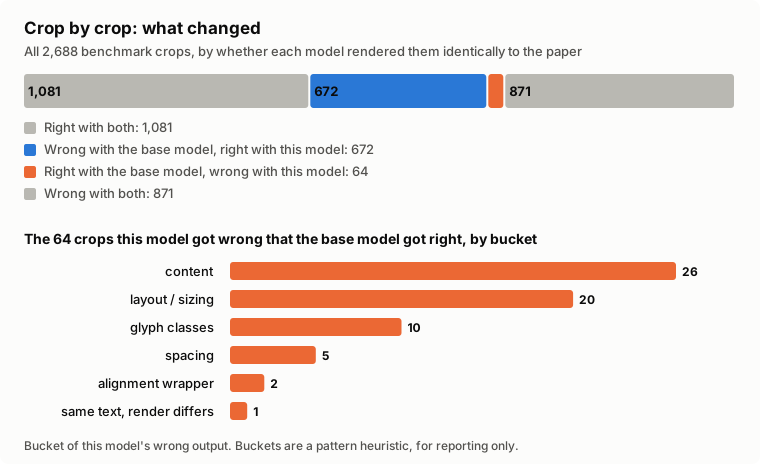
| <title id="t">Crop by crop: what changed</title> | |
| <desc id="d">Right with both: 1081; Wrong with the base model, right with this model: 672; Right with the base model, wrong with this model: 64; Wrong with both: 871</desc> | |
| <style> | |
| svg{font-family:system-ui, -apple-system, 'Segoe UI', Roboto, sans-serif} | |
| .bg{fill:#fcfcfb} .ink{fill:#0b0b0b} .sub{fill:#52514e} .grid{stroke:#d9d8d4;stroke-width:1} | |
| .base{fill:#eb6834} .tuned{fill:#2a78d6} .box{fill:#f1f0ec;stroke:#d9d8d4} .arrow{stroke:#52514e;fill:none;stroke-width:2} | |
| .good{fill:#2a78d6} .bad{fill:#eb6834} .neutral{fill:#b9b8b2} .mid{fill:#8f8e88} | |
| @media (prefers-color-scheme:dark){ | |
| .bg{fill:#1a1a19} .ink{fill:#f0efec} .sub{fill:#c3c2b7} .grid{stroke:#3a3a38} | |
| .base{fill:#d95926} .tuned{fill:#3987e5} .box{fill:#262625;stroke:#3a3a38} .arrow{stroke:#c3c2b7} | |
| .good{fill:#3987e5} .bad{fill:#d95926} .neutral{fill:#6b6a66} .mid{fill:#8f8e88} | |
| } | |
| </style> | |
| <rect class="bg" width="760" height="464" rx="8"/> | |
| <text x="24" y="34" class="ink" font-size="17" text-anchor="start" font-weight="600">Crop by crop: what changed</text> | |
| <text x="24" y="56" class="sub" font-size="13" text-anchor="start" font-weight="400">All 2,688 benchmark crops, by whether each model rendered them identically to the paper</text> | |
| <rect class="neutral" x="24.0" y="74" width="284.3" height="34" rx="3"/> | |
| <text x="28.0" y="96" class="ink" font-size="13" text-anchor="start" font-weight="600">1,081</text> | |
| <rect class="good" x="310.3" y="74" width="176.0" height="34" rx="3"/> | |
| <text x="314.3363095238095" y="96" class="ink" font-size="13" text-anchor="start" font-weight="600">672</text> | |
| <rect class="bad" x="488.3" y="74" width="15.0" height="34" rx="3"/> | |
| <rect class="neutral" x="505.3" y="74" width="228.7" height="34" rx="3"/> | |
| <text x="509.2886904761905" y="96" class="ink" font-size="13" text-anchor="start" font-weight="600">871</text> | |
| <rect class="neutral" x="24" y="122" width="12" height="12" rx="2"/> | |
| <text x="44" y="132" class="sub" font-size="13" text-anchor="start" font-weight="400">Right with both: 1,081</text> | |
| <rect class="good" x="24" y="144" width="12" height="12" rx="2"/> | |
| <text x="44" y="154" class="sub" font-size="13" text-anchor="start" font-weight="400">Wrong with the base model, right with this model: 672</text> | |
| <rect class="bad" x="24" y="166" width="12" height="12" rx="2"/> | |
| <text x="44" y="176" class="sub" font-size="13" text-anchor="start" font-weight="400">Right with the base model, wrong with this model: 64</text> | |
| <rect class="neutral" x="24" y="188" width="12" height="12" rx="2"/> | |
| <text x="44" y="198" class="sub" font-size="13" text-anchor="start" font-weight="400">Wrong with both: 871</text> | |
| <text x="24" y="244" class="ink" font-size="14" text-anchor="start" font-weight="600">The 64 crops this model got wrong that the base model got right, by bucket</text> | |
| <text x="214" y="276" class="ink" font-size="13" text-anchor="end" font-weight="400">content</text> | |
| <rect class="bad" x="230" y="262" width="446.0" height="18" rx="3"/> | |
| <text x="682.0" y="276" class="ink" font-size="12" text-anchor="start" font-weight="600">26</text> | |
| <text x="214" y="304" class="ink" font-size="13" text-anchor="end" font-weight="400">layout / sizing</text> | |
| <rect class="bad" x="230" y="290" width="343.1" height="18" rx="3"/> | |
| <text x="579.0769230769231" y="304" class="ink" font-size="12" text-anchor="start" font-weight="600">20</text> | |
| <text x="214" y="332" class="ink" font-size="13" text-anchor="end" font-weight="400">glyph classes</text> | |
| <rect class="bad" x="230" y="318" width="171.5" height="18" rx="3"/> | |
| <text x="407.53846153846155" y="332" class="ink" font-size="12" text-anchor="start" font-weight="600">10</text> | |
| <text x="214" y="360" class="ink" font-size="13" text-anchor="end" font-weight="400">spacing</text> | |
| <rect class="bad" x="230" y="346" width="85.8" height="18" rx="3"/> | |
| <text x="321.7692307692308" y="360" class="ink" font-size="12" text-anchor="start" font-weight="600">5</text> | |
| <text x="214" y="388" class="ink" font-size="13" text-anchor="end" font-weight="400">alignment wrapper</text> | |
| <rect class="bad" x="230" y="374" width="34.3" height="18" rx="3"/> | |
| <text x="270.3076923076923" y="388" class="ink" font-size="12" text-anchor="start" font-weight="600">2</text> | |
| <text x="214" y="416" class="ink" font-size="13" text-anchor="end" font-weight="400">same text, render differs</text> | |
| <rect class="bad" x="230" y="402" width="17.2" height="18" rx="3"/> | |
| <text x="253.15384615384616" y="416" class="ink" font-size="12" text-anchor="start" font-weight="600">1</text> | |
| <text x="24" y="450" class="sub" font-size="12" text-anchor="start" font-weight="400">Bucket of this model's wrong output. Buckets are a pattern heuristic, for reporting only.</text> | |
| </svg> | |